Project Design
Welcome to the design guide for geoenv! This page provides an overview of the architecture, components, and principles that shape the project. Our goal is to make geoenv intuitive to understand and easy to contribute to.
Have suggestions or questions? Open a GitHub issue —we’d love your feedback!
Project Overview
geoenv resolves geographic locations (as geometries) into meaningful environmental descriptions using spatial datasets 🌍 and semantic vocabularies 📖.
To make this possible, we designed around a clear set of priorities:
Functional Goals
Resolve spatial geometries to detailed environmental descriptions
Support key, high-value spatial data sources
Efficiently iterate over large numbers of geometries
Enable dynamic data source selection
Maintain traceability via location identifiers
Interoperability
Use open, widely adopted standards
Map terms to multiple ontologies and vocabularies
Output data in GeoJSON-compatible format
Convert to Science-On-Schema.Org Spatial Coverage
Efficiency
Process multiple data sources in parallel using asynchronous requests
Cache responses to avoid redundant queries
Cache data sources locally where possible
Sustainability
Use pluggable DataSource implementations
Promote community-driven growth
Architecture
The system is composed of core classes that collaborate using clearly defined contracts. The architecture 🏗 follows a strategy pattern for modular extensibility.
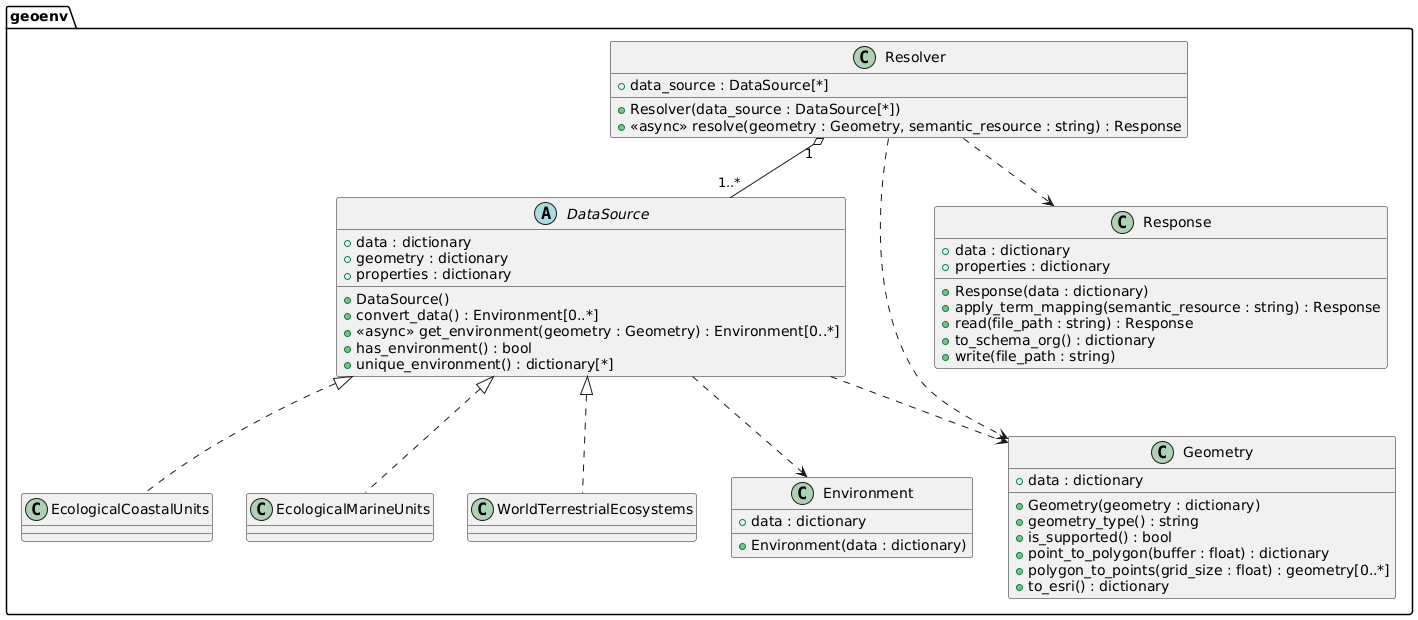
Resolver
The Resolver is the main entry point. You pass in a Geometry and a list of DataSource instances, and get back a structured Response:
Calls all configured data sources concurrently using asynchronous I/O
Wraps results into Environment objects
Maps terms to ENVO by default
Returns a Response object with the result set
Response
The Response structures results using a GeoJSON format, where environmental descriptions are stored under properties.environment.
You can:
Map terms to other vocabularies
Convert the response to Science-On-Schema.Org
Save or load the result for reuse
DataSource (ABC)
Defines the interface for any data source:
Standard methods and properties for consistency
Custom behaviors for data source-specific needs
May implement fallback behavior (e.g., point approximation for polygons)
Returns an Environment for each query.
Environment
Encapsulates the returned values from a data source:
Lightweight, minimal post-processing
Includes original terms
Geometry
Handles all client-supplied geometries in GeoJSON:
Identifies type (Point, Polygon)
Converts points to polygons
Transforms to formats required by a data source
Supports GeoJSON Point and Polygon types for now, with plans for GeometryCollections.
Response Data Format
The output is a GeoJSON Feature with nested environmental data. 📦
Top Level:
type (string): always “Feature”
identifier (string): unique ID for the query
geometry (object): the original geometry
properties (object): extra metadata, including environments
Properties:
description (string): the geometry description
environment (array): the resolved environments
Environment Object:
type (string): always “Environment”
dataSource (object): ID and name of the source
dateCreated (string): timestamp of the query
properties (object): key/value pairs of environmental properties
mappedProperties (array): label/uri pairs for semantic mappings
Example
{
  "type": "Feature",
  "identifier": "...",
  "geometry": {...},
  "properties": {
    "description": "...",
    "environment": [
      {
        "type": "Environment",
        "dataSource": {
          "identifier": "...",
          "name": "..."
        },
        "dateCreated": "...",
        "properties": {
          "temperature": "Warm Temperate",
          "moisture": "Dry",
        },
        "mappedProperties": [
          {"label": "temperate", "uri": "..."},
          {"label": "arid", "uri": "..."}
        ]
      }
    ]
  }
}
Semantic Mapping
We use SSSOM to link data source terminology to semantic vocabularies. 🧠
Mapping logic lives in
Response.apply_term_mappingEach data source has SSSOM files for each ontology/vocabulary
Error Handling
Error Propagation
Raised at the relevant layer 🚨
Always include actionable info ✅
Logging with daiquiri
Supports DEBUG, INFO, WARNING, ERROR
Logs include relevant metadata
Testing
We ensure test 🧪 coverage through:
Geometry tests – validation, conversions, type detection
DataSource tests – standard contract + edge cases
Response tests – semantic mapping and transformation checks
Mock tests – generated from real HTTP requests
Integration tests – Resolver end-to-end scenarios
Adding a New Data Source
Data Source
Add a module under data_sources/
Register it in data_sources/__init__.py
Implement the DataSource ABC
Support all required geometry types
Document special behaviors or config options
Keep data source-specific utilities scoped to the module
Semantic Mappings
Create SSSOM files for your vocabularies
Follow filename conventions for discovery
Tests
Create mock geometries
Use create_mock_data.py to record responses
Add tests for both valid and invalid inputs
Test both expected and edge behavior
We’re building geoenv to be sustainable, useful, and open. Your input helps shape its future 💚